Turn local searches into
inspection appointments.
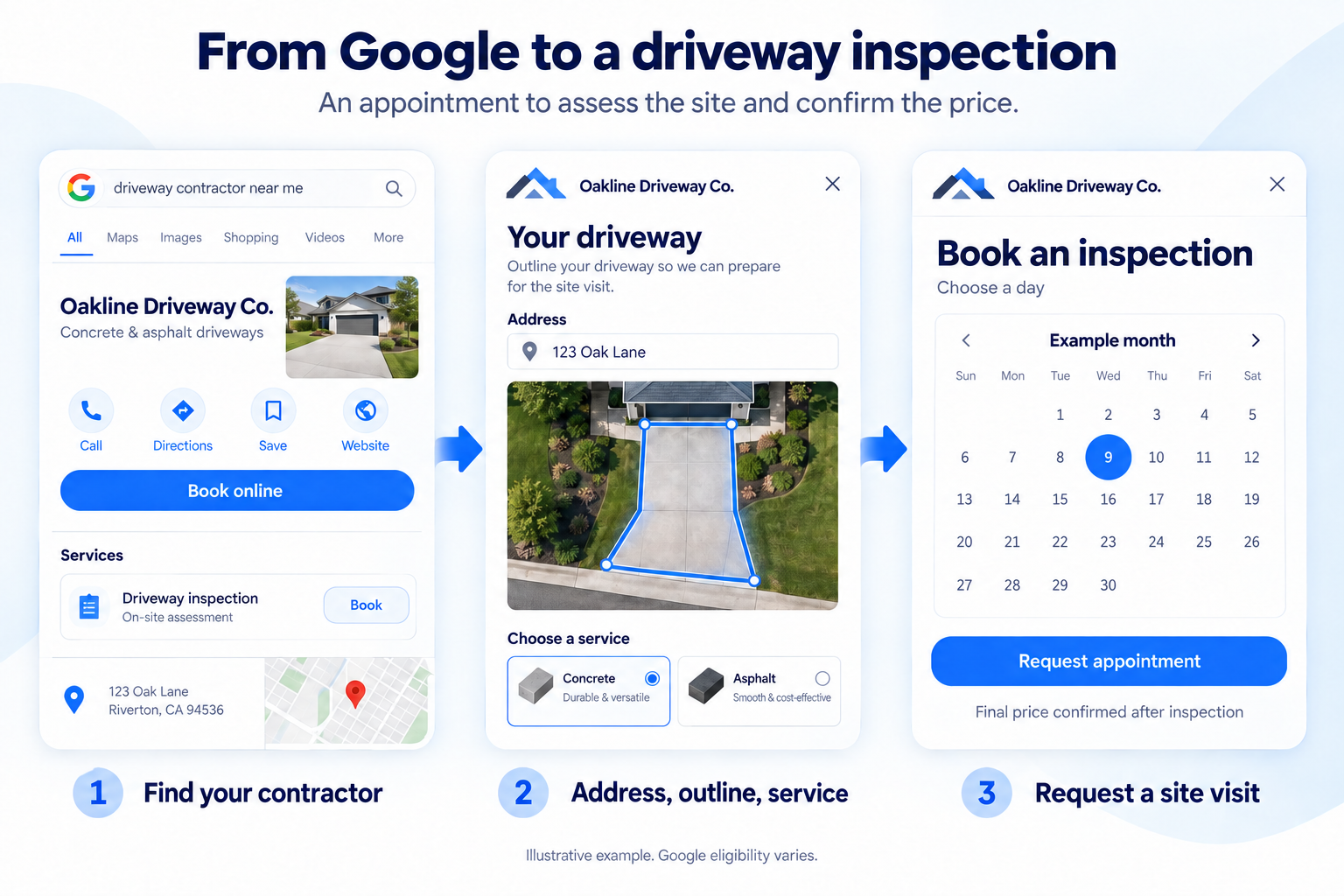
Homeowners find your concrete or asphalt business, enter their address, outline the driveway, and choose a service. Then they request an appointment for you to inspect the site and confirm the price.
Explore the planned Google appointment flow. The website estimator is available today.
From “Book online”
to an inspection appointment.
The homeowner describes the driveway before your visit. You inspect the site, discuss the work, and confirm the price in person.
Preview the planned Google appointment experience. Sample project only. No appointment or request is sent.
- 1Enter the address
Locate the property.
- 2Outline the driveway
Show the area to inspect.
- 3Choose a service
Concrete or asphalt work.
- 4Request an appointment
A site visit to confirm the price.
Try the appointment preview
Your Google Business Profile

Oakline Driveway Co.
Concrete & asphalt driveways
Your local service area
Book an appointment to inspect the driveway.
Illustrative profile. Google determines eligibility and how booking links or buttons appear.
Your brand. Your appointments.
A visit with the project already in view.
Your branded widget
Where is your project?
Start with the address so your crew knows where the work would be.
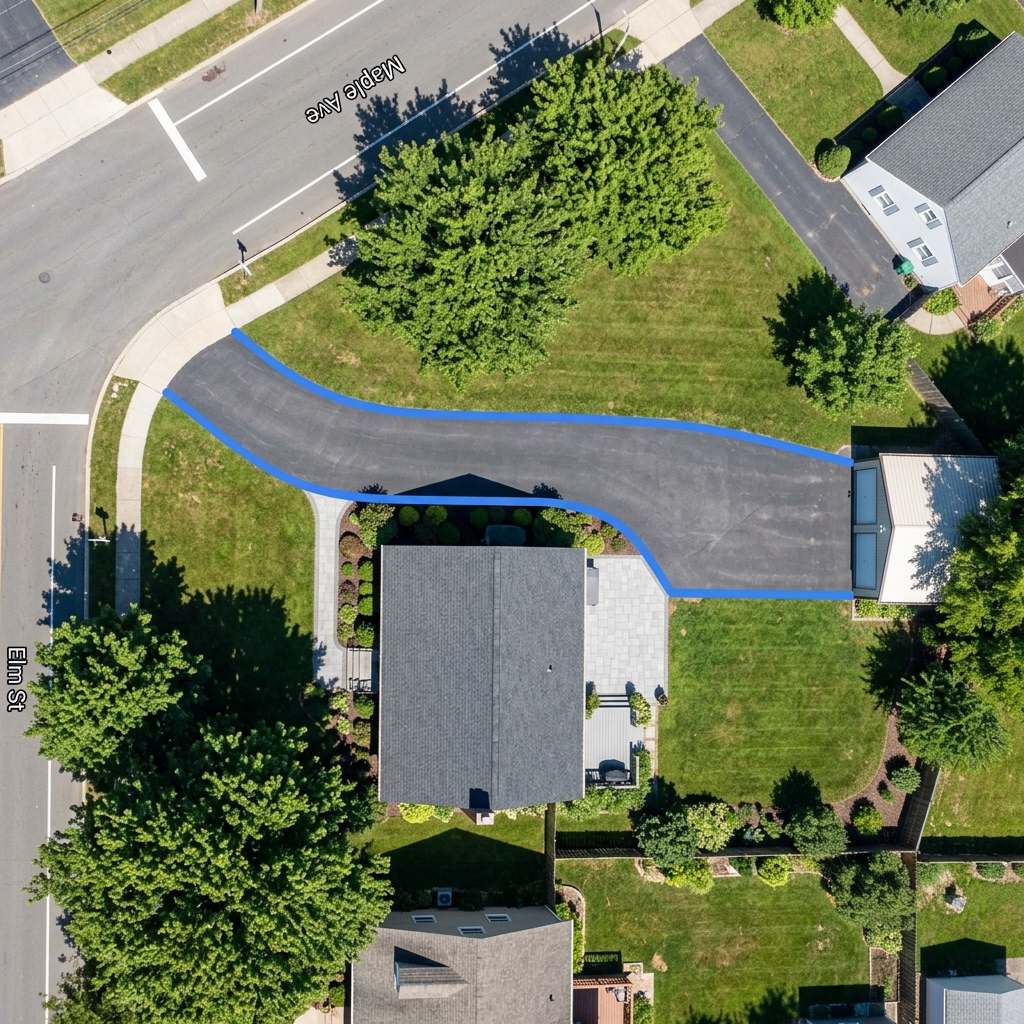
A driveway you can see and measure.
The homeowner traces the outline on satellite imagery.
What would you like done?
Show the services your business actually offers.
Book a driveway inspection.
Choose a day for a visit. Your contractor will inspect the site, discuss the scope, and confirm the price.
Inspection appointmentConcrete driveway · 650 sq ft example
Example dates, not live availability. Your contractor confirms the inspection appointment. The final price follows the visit.
Choose a day for the inspection appointment.
Back to your business website.
Not ready to request an appointment? Closing the widget would take the visitor to your website, where they can explore your work or contact you.
This is a preview of that handoff. You are still on DrivewaySatellite.
Try the steps above. The × previews the return to your website.
Arrive knowing what the homeowner needs.
Receive the address, driveway outline, and chosen service before the inspection. Use the visit to assess access, drainage, preparation, and the final price.
Google appointment booking is a planned feature, separate from the current website estimator. Availability and setup will be confirmed before purchase. How Google appointment eligibility works
Try the estimator behind the experience.
Enter an address and draw a driveway to see the current website widget in action. The demo uses example rates; your version uses your pricing.
Example Driveway: The Fresh Prince of Bel-Air's mansion (Uncle Phil is paying for this one).
Enter your address above to calculate your real price.
After you draw, you get:
Property found
Click Measure My Driveway to trace your driveway and get your price.
What currently covers this space?
Helps estimate removal costs




Based on regional planning assumptions
Project location
EstimatedLocation estimated from the traced area
Price Comparison For -- ft²
Want local contractors to price this project?
We’ll check who can help in your area and email you the options.
No obligation to move forward.
Keep your estimate
Keep your measurements and price range so you can come back later.
Both options are delivered by email so you can reopen your estimate anytime.
What You Get
Know the project before you pick up the phone.
Give homeowners a useful starting point, even when your office is closed. They can measure their driveway, explore a budget, and share the project with your team when they are ready to talk.
The current website widget brings the address, estimated area, slope, and contact details into one inquiry. The planned Google appointment flow would bring those project details into a request for an inspection visit, where you assess the site and confirm the price.
New Pre-Measured Lead
Just now via Your Website
How it works
Your services and pricing. A useful next step for the homeowner.
We configure it with your rates
Share your rates, service area, and branding. We configure your website estimator. Interested in Google appointments? We discuss profile eligibility and the planned booking setup separately.
Homeowners measure their driveway
They locate their home on satellite, trace their driveway outline, choose their material, and instantly view a ballpark price estimate based on your rates.
You get pre-measured leads
Receive the homeowner’s project and contact details by email. With the planned appointment flow, you would also receive a requested inspection day. Confirm the visit, then assess the site and agree the final price.
Choose your website estimator plan.
Start with a branded estimator for your website, configured around your rates and service area.
Interested in Google appointments? The preview above shows a planned feature. These prices cover the current website estimator; Google appointment booking is not included yet. Talk with us about availability and setup before choosing a plan for that feature.
Starter
Perfect for local owner-operated crews looking to streamline pricing.
- Shared territory (no lockouts) - other competitors can also use our technology
- 1 website integration on your primary business domain
- We build it to your needs - we load your exact rates, travel fees, and service area rules
- Co-branded widget interface (DrivewaySatellite footer)
- Instant email lead alerts delivered to your inbox
- No CRM integrations (leads sent via email only)
- Standard email customer support queue response
Exclusive
For growing multi-crew companies aiming to dominate their local market.
- Exclusive territory (5 ZIPs locked) - no other competitor can use our technology
- 1 website integration on your primary business domain
- We build it to your needs - we load your exact rates, travel fees, and service area rules
- White-label widget interface (your custom branding only)
- Instant email and SMS lead alerts delivered to you
- Zapier and CRM integrations (Jobber, Housecall, etc)
- Priority phone and email support queue response
Enterprise
For multi-location operations, large paving firms & franchises.
- Custom territory (regional lockout) - no other competitor can use our technology
- Unlimited website integrations across all local domains
- We build it to your needs - we load your exact rates, travel fees, and service area rules
- White-label widget interface (your custom branding only)
- Instant email and SMS lead alerts delivered to you
- API and webhook access plus CRM integrations
- Dedicated Account Manager with priority support
Backed by our 30-day money-back guarantee. Cancel anytime with a single click.
A few things to know about Google appointments.
Can every contractor get a “Book online” button?
No. Google controls eligibility and presentation based on the business, location, and booking setup. An appointment link you add yourself and a provider-powered “Book online” button are different routes. We cannot guarantee a particular button or placement. Read Google’s business-link requirements.
Can I use this Google appointment flow today?
The interactive example is a preview, not a live Google integration. The website estimator is available now. Google appointment booking and the return-to-website handoff are planned. Tell us about your business so we can discuss the setup and availability before you purchase.
What is the appointment for?
It is an on-site driveway inspection. The homeowner shares their address, outlines the driveway, chooses a service, and requests a day for you to visit. You check the site and discuss the scope before confirming the price. Any installation date is agreed afterward. The planned Google appointment page must let the homeowner complete the appointment-booking action it advertises.
What if the homeowner has a question or closes the widget?
The planned journey includes a way to ask a question without selecting a date. Closing it would return the homeowner to your business website, where they can see your projects, learn about your services, or call you.
Would the link send visitors to a contractor directory?
No. The proposed booking page would be specific to your business, with your services, inspection appointments, and contact details. The homeowner would be requesting help from your team.